
Payments or lanes are failing
Registers, payment terminals, printers, kitchen devices, and drive-thru equipment can share a local or vendor path.
Payments or lanes are affectedGreater New Orleans · Regional Louisiana
Local field support for the internet, payments, networks, phones, cameras, and vendors that keep business moving.
Typical field outcome Vendor path coordinated
What you receive Site mapped and labeled
What we fix
Choose the situation that sounds closest. The next conversation can start with the systems and people already affected.
Registers, payment terminals, printers, kitchen devices, and drive-thru equipment can share a local or vendor path.
Payments or lanes are affectedConnection loss, slow service, or devices dropping offline can begin with the internet path or the local network.
Internet or Wi-Fi is affectedMissed calls, extensions, paging, and call routing can depend on the carrier, local network, and phone vendor.
Phones or call flow are affectedOn-site power, cabling, network paths, recorders, and specialist vendors may all shape the next check.
Cameras or access are affectedCircuits, cabling, equipment placement, vendor visits, and handoff records benefit from one readiness plan.
Plan a new locationShared notes, site inventories, vendor paths, and a repeatable next step help teams compare what is happening.
Plan multi-site coordinationField proof
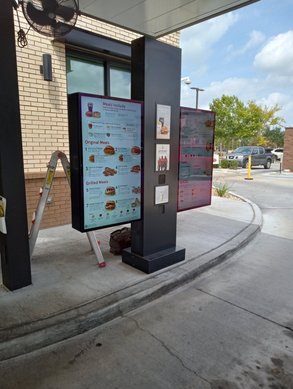
Business symptom and constraint Ordering equipment is unavailable while the lane and customer flow still need to be managed.
Work and coordination Trace power, cabling, the local network path, and the equipment handoff without claiming which component failed.
Result and documented handoff Leave photos, connection notes, vendor context, and the practical next action for the site team.
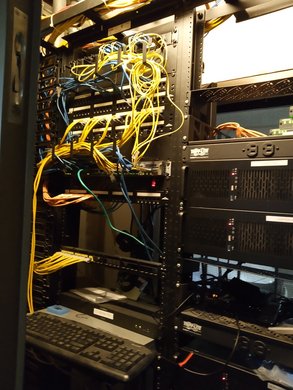
Business symptom and constraint Internet, Wi-Fi, phones, or connected devices are difficult to trace in a busy equipment rack.
Work and coordination Inspect equipment, uplinks, patching, power, and available carrier or vendor details around the affected path.
Result and documented handoff Provide labeled photos, a clearer equipment map, observations, and vendor-ready notes.
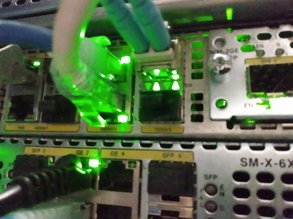
Business symptom and constraint A lane, phone, camera, or access device is unavailable but the business cannot assume the cause.
Work and coordination Follow the physical connection and supporting network path, then organize the appropriate vendor conversation.
Result and documented handoff Record the observed port, cable, related equipment, test notes, and agreed next step.
How it works
Systems explorer
Use this as a shared vocabulary for the site. It is not required before calling or planning work.
The site loses internet, cloud tools disconnect, or an expected backup path does not appear to take over.
On-site power, provider handoff, modem or gateway, router path, physical connections, and any documented backup circuit.
Internet carrier, local network, payment path, phones, and any provider-managed equipment.
Observed conditions, test notes, labeled photos, vendor context, and a documented next step.
Call 504.881.0043Wi-Fi is unreliable, connected devices drop, coverage is uneven, or nobody can trace a cable or switch path.
Switches, access points, power, uplinks, patching, cabling, and the configuration information available to the site.
Internet carrier, POS, phones, cameras, access equipment, and the vendors that depend on the local network.
A practical network map, labels, photos, test observations, and documented vendor dependencies.
Call 504.881.0043A register, payment lane, printer, kitchen device, or drive-thru component is unavailable or inconsistent.
On-site power, data connection, cabling, local network path, device location, and the relevant vendor handoff.
POS provider, payment processor, internet and network paths, printer, kitchen, and drive-thru vendors.
Connection notes, photos, labels, observed test results, vendor context, and a clear handoff.
Call 504.881.0043Calls, extensions, paging, cameras, recording views, or an access-system path are not available as expected.
On-site power, endpoints, cabling, network connections, equipment paths, and the available carrier or vendor information.
Phone carrier or provider, local network, camera or recorder vendor, and access-system vendor.
Device and location notes, photos, labels, observed conditions, vendor details, and next steps.
Call 504.881.0043A new site, move, migration, or recurring multi-site issue lacks one clear inventory, readiness plan, or handoff.
Site count, existing records, circuit and equipment placement, cabling readiness, vendor scope, and timing constraints.
Carriers, POS, phone, camera and access vendors, contractors, site managers, and internal technology contacts.
Readiness notes, site inventory, photos, labels, vendor dependencies, and a documented coordination checklist.
Plan workService area and contact
Greater New Orleans and regional Louisiana. Call for an active customer-facing issue, or prepare a planned-work email draft below.
Built for the sites where local coordination matters.